

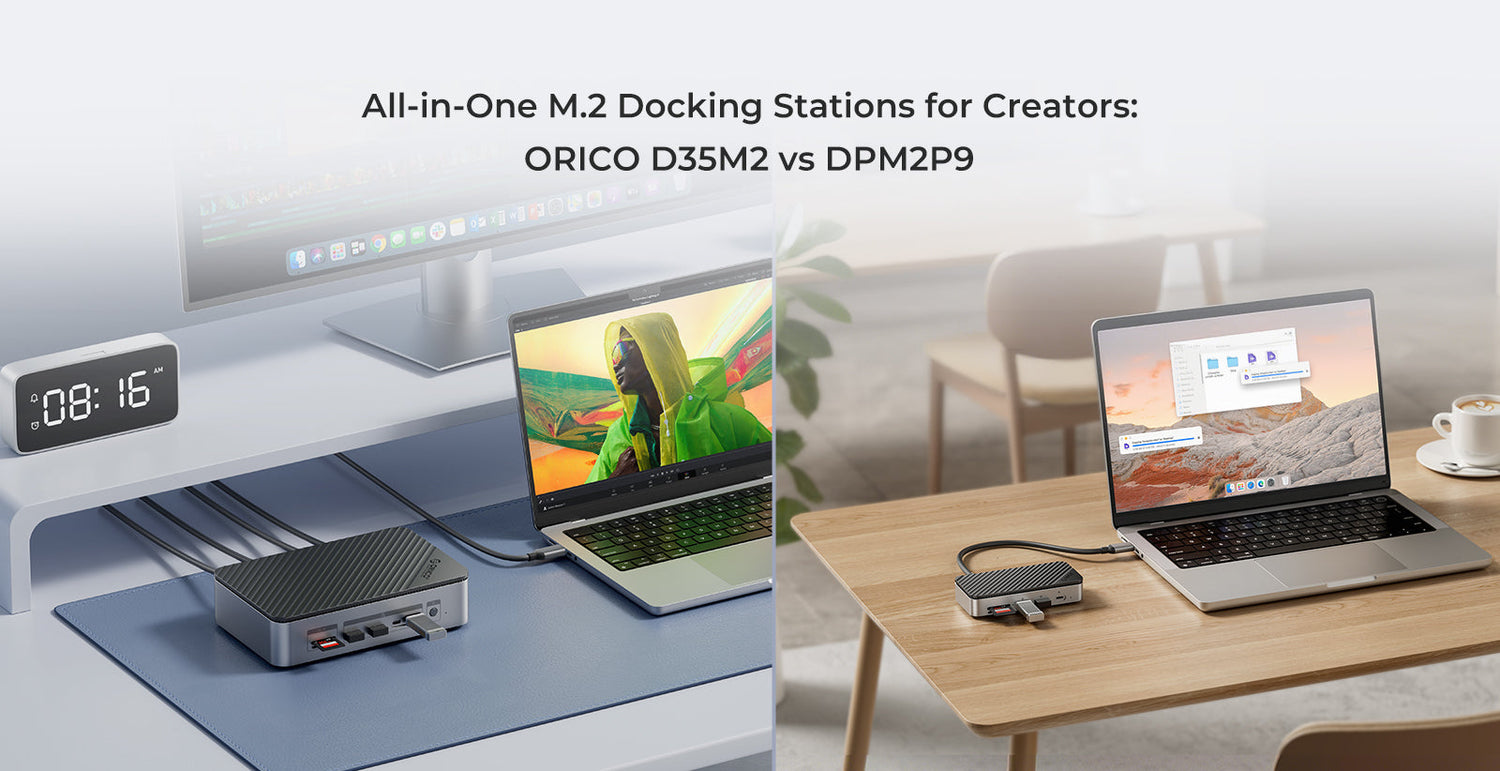
All-in-One M.2 Docking Stations for Creators: ORICO D35M2 vs DPM2P9
Laptops are getting thinner, but your projects keep getting bigger. 4K footage, RAW photos, game assets and plug-ins quickly eat up internal storage, and a single USB-C port often has to handle everything.
An all-in-one M.2 docking station solves this in a clean way: one device that gives you more ports and turns an M.2 SSD into fast external storage. ORICO D35M2 and ORICO DPM2P9 are two different takes on this idea—one compact and mobile, one built as a desktop storage hub.
This guide focuses on what really matters in daily use, so you can quickly decide which dock fits your workflow.
Why a single M.2 dock helps
A typical creator desk can easily end up with one USB-C hub for ports, one M.2 enclosure for fast storage, one drive dock for backups, and one or two card readers. Technically it works, but it means more cables, more power bricks, and more chance of forgetting “one last adapter” when you leave home.
With an all-in-one M.2 docking station you can:
- Plug in a single USB-C cable and have display, storage, network and peripherals ready.
- Reuse an M.2 NVMe or SATA SSD instead of leaving it in a drawer.
- Keep the laptop charged through the same dock (when your device and charger support USB-C PD).
- Keep the desk visually clean so you can focus on the actual work.
ORICO DPM2P9 and D35M2 follow the same concept but are tuned for different usage styles: one is compact and mobile-friendly, the other is a desktop-class storage hub.

ORICO DPM2P9 overview
The ORICO DPM2P9 is a 10-in-1 compact M.2 dock designed to live next to your laptop or travel in your bag.
Key features
- M.2 SSD support: Dual-protocol M.2 NVMe/SATA slot, M-Key and B&M-Key, up to 4TB, tool-less installation.
- USB expansion: One USB 3.2 Gen2 Type-A (10Gbps), one USB-C 10Gbps, plus two USB 3.0 Type-A for everyday devices.
- Display and network: HDMI 4K@60Hz (requires video-enabled USB-C on the host) and Gigabit Ethernet.
- Card readers and power: SD/TF 3.0 card slots, and USB-C power input with up to 100W PD pass-through for compatible laptops.
Best for
DPM2P9 suits you if you:
- Mainly use a laptop and often work in different places.
- Have one M.2 SSD you want to turn into a fast project drive.
- Want a small, tidy dock instead of a full desktop enclosure.

ORICO D35M2 overview
The ORICO D35M2 is a 12-in-1 M.2 and dual-bay HDD/SSD dock designed as a permanent desktop hub.
Key features
- Dual-bay storage: One M.2 NVMe/SATA bay (up to 8TB) plus one 2.5"/3.5" SATA bay (up to 18TB), for up to 26TB in total.
- M.2 cooling: Includes thermal pads and a heatsink to help NVMe SSDs stay stable during long high-speed transfers.
- USB expansion: Two USB-C 10Gbps and three USB-A 10Gbps ports for external drives and high-speed peripherals.
- Display and network: HDMI 4K@60Hz and RJ45 Ethernet for a reliable wired connection.
- Power and design: 12V power input for the enclosure and 3.5" drives, USB-C PD up to 100W for the host, desktop chassis in aluminum alloy and ABS.
Best for
D35M2 is built for creators who:
- Work mainly at a fixed desk with a laptop, Mac mini or mini PC.
- Need both fast SSD storage and high-capacity HDDs for projects and backup.
- Prefer one central hub under the monitor instead of several separate boxes.

Key differences at a glance
- Storage: DPM2P9 has one M.2 NVMe/SATA slot up to 4TB. D35M2 has an M.2 NVMe/SATA bay up to 8TB plus a 2.5"/3.5" bay up to 18TB (up to 26TB total).
- Form factor: DPM2P9 is slim and portable; D35M2 is a larger desktop enclosure meant to stay on your desk.
- Workflow fit: DPM2P9 is “laptop-first, move-often”, while D35M2 is “desk-first, many drives”.
How to choose in 30 seconds
Pick DPM2P9 if…
- Your main machine is a laptop you carry around.
- You only plan to use one M.2 SSD as a working drive.
- You want less to carry, not more.

Pick D35M2 if…
- Your main machine stays on a desk most of the time.
- You use (or plan to use) several 2.5"/3.5" HDDs or SSDs.
- You want one hub to handle editing, backup and archiving in one place.

Quick setup tips
Getting started
- Install the M.2 SSD. Check that it matches the supported type (NVMe or SATA, M-Key or B&M-Key), insert and secure it. For NVMe drives in D35M2, attach the included thermal pads and heatsink.
- For D35M2, add a 2.5"/3.5" SATA drive if needed, connect the 12V power adapter, and use the independent switch to bring the drive online or offline.
- Connect the dock to your laptop or desktop with the included USB-C cable, format the drives in your operating system, and keep all peripherals—display, Ethernet, keyboard, mouse and readers—plugged into the dock.
Summary
Both ORICO DPM2P9 and ORICO D35M2 are built to turn one USB-C port into a complete desk: storage, display, network and peripherals through a single cable.
If you care most about portability and a clean setup for one laptop and one M.2 SSD, DPM2P9 is the straightforward choice. If your desk is the heart of your work and you juggle multiple drives and large projects, D35M2 is the better fit as a desktop storage hub.
Pick the model that matches how you actually work—not just the spec sheet—and your desk will feel lighter even when your projects get heavier.
Leave a comment
All comments are moderated before being published.
This site is protected by hCaptcha and the hCaptcha Privacy Policy and Terms of Service apply.